



Table of Contents
ToggleA few years ago, the idea of replacing a bulky desktop tower with something the size of your hand sounded unrealistic. But today, mini PCs like the Kamrui series are quietly changing how people work, study, and even entertain themselves at home. If you’ve ever struggled with limited desk space, noisy computers, or high electricity bills, the Kamrui mini PC often shows up as an affordable solution.
The challenge most users face is simple: they want a compact computer that can still handle everyday tasks like browsing, office work, streaming, light editing, or running a small business setup—without spending a fortune. That’s exactly where the Kamrui mini PC lineup, including models like the E1 series, tries to fit in.
But does it actually deliver in real-world use, or is it just another budget device with marketing hype?
In this article, we’ll go beyond the spec sheet and focus on practical experience—what it feels like to set up, how it performs in daily tasks, where it shines, and where it falls short. This is a grounded, user-focused breakdown to help you decide whether a Kamrui mini PC is worth your money.
What is the Kamrui Mini PC?
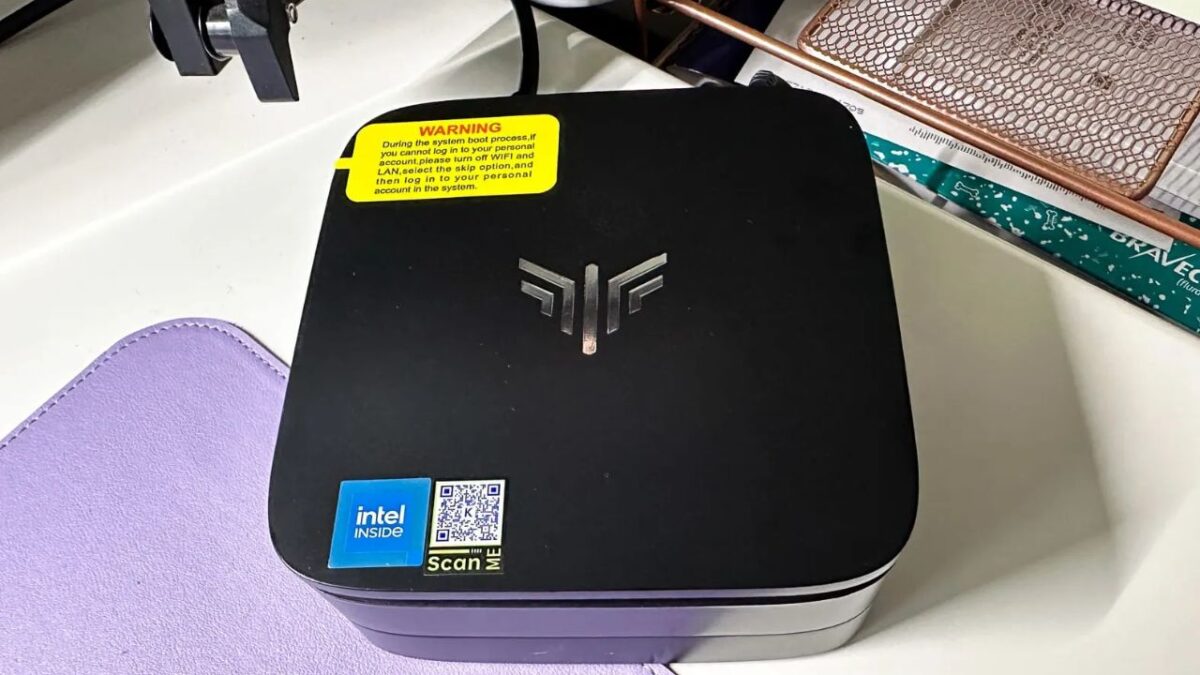
A Kamrui mini PC is a compact desktop computer designed to deliver basic to mid-level computing power in a very small form factor. Instead of a traditional bulky tower, everything is packed into a box that can easily sit behind a monitor or even mount on the back of a screen.
KAMRUI focuses on budget-friendly systems that often run Windows and use energy-efficient Intel or AMD processors.
Most models, including entry-level units like the Kamrui E1 mini PC, are built for everyday productivity rather than heavy gaming or professional 3D work.
In practical terms, think of it as:
- A replacement for old office desktops
- A compact home PC for students
- A lightweight business or POS system
- A media streaming device for TVs
Kamrui Mini PC Specs Overview
While exact specifications vary between models, most Kamrui mini PCs share a similar hardware philosophy: efficiency over raw power.
Typical specs you’ll find include:
Processor (CPU):
- Intel Celeron / Intel N-series (N95, N100 in newer models)
- Designed for low power consumption and stable performance
RAM:
- 8GB to 16GB DDR4 (some upgradeable)
- Enough for multitasking like Chrome tabs + Office apps
Storage:
- 256GB to 512GB SSD (NVMe in better models)
- Fast boot times and quick file access
Graphics:
- Integrated Intel UHD Graphics
- Suitable for 4K video playback, light editing, and streaming
Connectivity:
- HDMI or dual HDMI ports
- USB 3.0 ports
- Ethernet LAN
- Wi-Fi + Bluetooth support
Operating System:
- Windows 11 (most models pre-installed or supported)
Real-World Interpretation of Specs
On paper, these specs may look modest. But in real usage, SSD storage and newer Intel low-power chips make a big difference. Boot times are usually under 15 seconds, and everyday tasks feel smooth if you stay within light-to-medium workloads.
Performance: What It’s Like in Daily Use
This is where expectations matter.
A Kamrui mini PC is not built to compete with gaming laptops or high-end desktops. Instead, it shines in predictable, everyday scenarios.
Smooth Tasks
- Web browsing (10–20 tabs)
- Microsoft Office (Word, Excel, PowerPoint)
- Online classes and Zoom meetings
- 4K video streaming (YouTube, Netflix)
- Basic photo editing
Moderate Tasks (still usable)
- Light Photoshop work
- Small coding projects
- Running multiple productivity apps
Weak Areas
- Heavy gaming (AAA titles are not suitable)
- 4K video editing
- Large-scale rendering or CAD work
Real Experience Insight
In day-to-day use, the system feels closest to a “fast Chromebook but with Windows flexibility.” If you keep expectations realistic, the experience is surprisingly stable. The SSD plays a huge role in making everything feel responsive, even when the CPU is entry-level.
Kamrui Mini PC E1 Model Explained
The Kamrui E1 mini PC is often one of the most searched versions because it sits in the entry-level category.
Typical positioning:
- Budget-friendly
- Office and home use focused
- Energy efficient
- Silent operation
What users like about E1:
- Very low noise (often fanless or near-silent cooling)
- Compact design fits behind monitors
- Easy plug-and-play setup
- Affordable price point
Limitations:
- Not designed for multitasking-heavy professionals
- Limited upgrade potential in some variants
- Basic integrated graphics only
If your workload is browsing, documents, YouTube, and light software, the E1 is usually enough.
Kamrui Mini PC Setup Guide
One of the strongest advantages of a Kamrui mini PC is how easy it is to set up.
Step-by-step setup experience:
- Unbox and connect power
The device is lightweight and typically includes a power adapter, HDMI cable, and mounting bracket. - Connect to monitor/TV
Use HDMI or dual HDMI if supported. - Attach keyboard and mouse
Any USB or wireless set works instantly. - Initial Windows setup
Sign in, connect Wi-Fi, and update Windows. - Install essential software
- Chrome or Edge
- Office suite
- Media player
- Any business tools you need
Real-world note:
Most users are surprised by how fast setup is. From box to usable desktop often takes under 20 minutes.
Use Cases: Who Should Buy It?
A Kamrui mini PC is not for everyone, but it is extremely useful in the right scenario.
Best for:
1. Students
- Online classes
- Assignments
- Research work
2. Office workers
- Excel, Word, presentations
- Email and CRM tools
3. Home entertainment
- Netflix, YouTube on TV
- Basic media server
4. Small businesses
- Billing systems
- POS setups
- Admin workstations
5. Minimal desk setups
- People who want clean, clutter-free desks
Pros and Cons (Honest Breakdown)
Pros
- Very compact and space-saving
- Affordable compared to full desktops
- Low power consumption
- Silent or near-silent operation
- Fast SSD performance
- Easy setup and portability
Cons
- Not suitable for heavy gaming
- Limited upgrade options in some models
- Integrated graphics only
- Performance drops under heavy multitasking
Real-World Performance Expectations
One of the biggest mistakes buyers make is expecting laptop-level or gaming PC performance from a mini PC.
Here’s a simple way to understand it:
- If your needs are 70% browsing + office + media → it works great
- If your needs include editing, gaming, or heavy workloads → it may feel limited
A Kamrui mini PC performs best when used as a “daily driver machine” rather than a power workstation.
Energy Efficiency and Noise
A major advantage that often gets overlooked is power efficiency.
Compared to traditional desktop PCs:
- Lower electricity usage
- Less heat output
- Often no audible fan noise
This makes it ideal for:
- 24/7 office systems
- Home media setups
- Quiet study environments
Should You Buy a Kamrui Mini PC?
If you need a budget-friendly, compact, and simple computer for everyday tasks, then yes—it makes sense.
But if you expect:
- High-end gaming performance
- Video production workloads
- Heavy engineering software
Then you should consider a more powerful desktop or workstation.
The Kamrui mini PC succeeds by doing the basics well, not by trying to be everything.
Conclusion
The Kamrui mini PC lineup represents a practical shift in how we think about desktop computing. Instead of large, power-hungry machines, you get something compact, efficient, and surprisingly capable for everyday use.
In real-world experience, it feels less like a “budget compromise” and more like a “purpose-built tool.” It won’t replace high-performance systems, but it doesn’t try to. Its strength lies in simplicity: plug it in, set it up, and get to work.
For students, office users, and home setups, KAMRUI delivers a balanced experience that focuses on practicality over power. If your expectations match its design, you’ll likely find it to be a reliable and space-saving computing solution.
At Royal Etable, we explore the world of gaming with a focus on gameplay experiences, trending titles, and player insights that bring the virtual world to life. We also highlight gaming journeys, strategies, and updates that help gamers stay ahead and enjoy every level with a deeper understanding.