


Table of Contents
ToggleIf you have ever noticed horizontal lines cutting across the screen while playing a game, you have probably encountered VSync—even if you did not know what it was called. On the other hand, you may have turned VSync on and wondered why your game suddenly feels less responsive, or turned it off and gained FPS but started seeing distracting screen tearing.
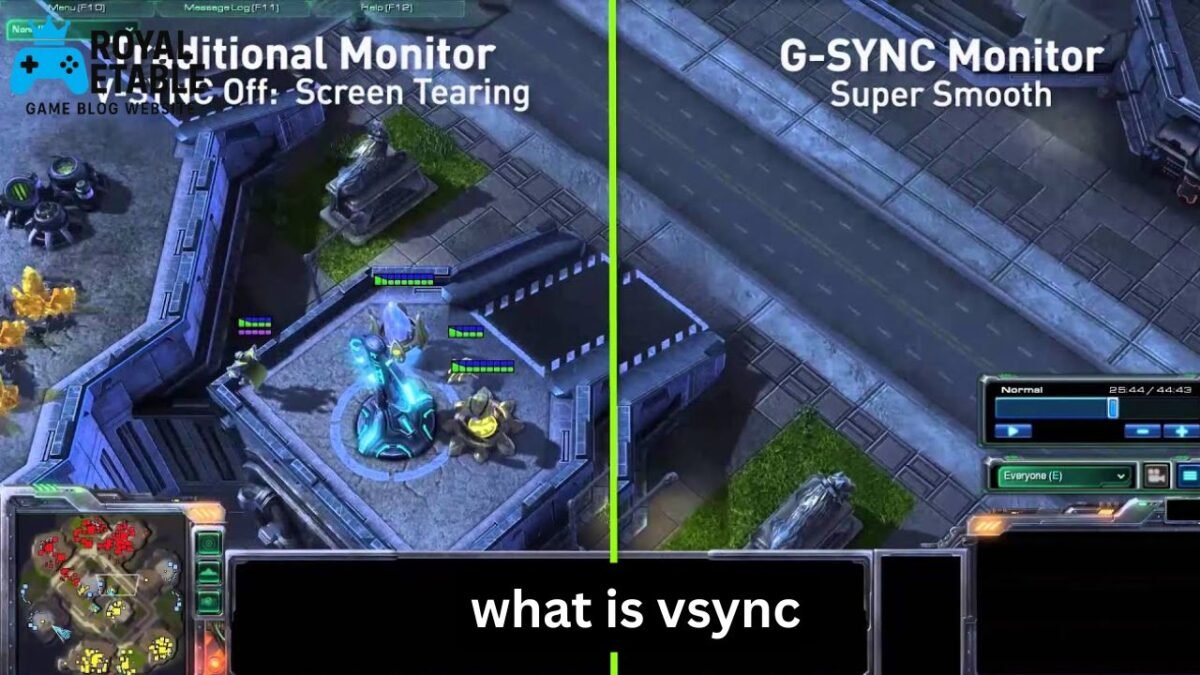
So, what is VSync? VSync, short for Vertical Synchronization, is a graphics setting that synchronizes a game’s frame output with your monitor’s refresh cycle. Its main purpose is to reduce or eliminate screen tearing, where different parts of multiple frames appear on the screen at the same time.
The confusing part is that VSync is not automatically “better” when enabled or disabled. The right setting depends on your monitor’s refresh rate, GPU performance, game type, and whether you care more about visual smoothness or input responsiveness.
This guide explains how VSync actually works, what it does in games such as Minecraft, Skyrim, ARK, and Overwatch, what “Fast VSync” means, and when you should use it.
What Is VSync in Games?
VSync is a technology that synchronizes the frame rate produced by your graphics card with your monitor’s refresh rate.
For example, imagine you have a 60 Hz monitor. It refreshes the image 60 times per second. If your GPU is rendering a game at 120 FPS, the GPU can produce frames faster than the monitor can display them.
Without synchronization, the monitor may begin displaying one frame and then receive another frame before the previous one has completely finished being displayed. This can create a visible horizontal break called screen tearing.
VSync attempts to prevent this by controlling when new frames are presented.
A simple example
Suppose your monitor is 60 Hz:
- GPU: 120 FPS
- Monitor: 60 Hz
- VSync: Off
The GPU is producing twice as many frames as the monitor can refresh. You may see tearing.
With traditional VSync enabled, the game tries to synchronize frame presentation with the monitor’s refresh cycle.
The result can look cleaner, particularly in games with lots of horizontal camera movement.
What Is VSync Used For?
The primary purpose of VSync is reducing screen tearing.
Screen tearing is particularly noticeable when:
- Turning the camera quickly
- Looking across a detailed landscape
- Moving through a city or open world
- Playing at a high frame rate on a fixed-refresh display
- Scrolling or rotating the camera horizontally
VSync can make the image appear more visually coherent because the monitor is less likely to display portions of different frames simultaneously.
However, VSync does not increase your monitor’s refresh rate and does not magically make a game smoother when your hardware cannot maintain a suitable frame rate.
That distinction is important.
VSync solves a synchronization problem; it does not solve a performance problem.
How Does VSync Actually Work?
To understand VSync, it helps to think of your GPU and monitor as two devices working at different speeds.
The GPU renders frames.
The monitor displays those frames according to its refresh cycle.
If the GPU finishes a new frame while the monitor is already in the middle of displaying another one, timing can become mismatched.
Traditional VSync can effectively make the GPU wait for an appropriate display interval before presenting another frame.
This is where the term VSync interval comes into play.
What Is VSync Interval?
A VSync interval is essentially the timing relationship between frame presentation and the monitor’s vertical refresh.
On a 60 Hz display, one refresh cycle lasts approximately:
1 ÷ 60 = 16.67 milliseconds
A 120 Hz monitor refreshes approximately every 8.33 ms, while a 144 Hz monitor refreshes about every 6.94 ms.
Traditional VSync tries to present frames in step with these refresh opportunities.
The downside is that waiting can sometimes introduce additional latency or cause noticeable frame-rate behavior when the GPU cannot consistently meet the refresh timing.
VSync On vs. Off
The easiest way to understand VSync is to compare both settings.
| Setting | Main advantage | Main disadvantage |
|---|---|---|
| VSync On | Reduces screen tearing | Can increase latency |
| VSync Off | Usually lowest latency | Screen tearing can appear |
| Fast Sync | Reduces tearing with high FPS | Works best when FPS is well above refresh rate |
| Adaptive Sync/VRR | Dynamically matches refresh to FPS | Requires compatible hardware/display |
VSync On
VSync is useful when tearing bothers you more than a small increase in input latency.
For slower-paced single-player games, this can be a perfectly reasonable choice.
VSync Off
Turning VSync off allows the GPU to present frames without waiting for the traditional synchronization mechanism.
This can reduce latency and is often preferred for competitive gaming.
The trade-off is possible tearing.
If you are playing a fast shooter and care about immediate mouse response, VSync Off may feel noticeably better.
What Is VSync Mode?
“VSync mode” is not necessarily one universal technology. Different games and graphics drivers may use the term to describe different synchronization options.
Depending on the game or GPU software, you might encounter settings such as:
- Off
- On
- Adaptive
- Fast
- Enhanced or driver-specific synchronization modes
The important thing is to read what the specific game or graphics driver means by the option.
Do not assume that every setting labeled “VSync” behaves identically across every game.
What Is Fast VSync?
Fast VSync is a synchronization technique designed to reduce tearing without forcing the GPU to behave exactly like traditional VSync.
It is particularly useful when your GPU can render significantly more frames than your monitor can display.
For example, imagine:
- Monitor: 60 Hz
- GPU output: 180 FPS
A fast synchronization method can use the excess rendered frames in a way intended to reduce tearing while avoiding some of the latency characteristics associated with conventional VSync.
This is why Fast Sync-type technologies can be interesting for high-FPS systems.
The catch with Fast VSync
Fast synchronization is not a magic replacement for every situation.
If your GPU only produces around 55 FPS on a 60 Hz display, there is not a large pool of extra frames to work with.
Fast synchronization tends to make more sense when the game is running comfortably above the monitor’s refresh rate.
Should You Use VSync?
There is no universal answer.
Use this practical rule:
If you see screen tearing and do not care strongly about the lowest possible input latency, try VSync On.
If you are playing a competitive game and want the most responsive controls possible, try VSync Off and evaluate whether the tearing is acceptable.
For many modern gaming setups, variable refresh technologies can be an even better solution because they dynamically synchronize the display refresh with the GPU’s frame output.
What Is VSync in Minecraft?
Minecraft is an interesting example because its frame rate can vary significantly depending on render distance, shaders, mods, world complexity, and hardware.
If you enable VSync in Minecraft, the game attempts to synchronize frame presentation with your monitor.
For example, on a 60 Hz monitor, you may see the game settle around 60 FPS when the system can maintain that performance.
Should VSync be on in Minecraft?
For casual Minecraft players, VSync can be useful if you notice tearing while turning or moving around.
If your priority is maximum FPS—for example, when testing shaders or benchmarking performance—you may prefer VSync Off.
There is another practical consideration: Minecraft can sometimes produce very high frame rates in relatively simple scenes. If your monitor is only 60 or 75 Hz, rendering hundreds of frames per second may provide little visible benefit while increasing GPU workload.
In that situation, a sensible FPS limit can be more useful than simply chasing the highest number.
What Is VSync in Skyrim?
Skyrim can benefit from synchronization because its large environments and frequent camera movement can make tearing obvious.
Traditional VSync may help produce a cleaner-looking image when exploring the world.
However, Skyrim also demonstrates why synchronization settings should not be treated as a universal performance fix.
If the system struggles to maintain the monitor’s refresh rate, enabling traditional VSync can make frame delivery feel less consistent.
For a slower single-player RPG, though, many players consider the reduction in tearing worth the trade-off.
What Is VSync in ARK?
ARK: Survival Evolved can be demanding, particularly with high graphics settings, large viewing distances, and complex environments.
If ARK is already running below your monitor’s refresh rate, simply enabling VSync will not create additional performance.
Instead, VSync can limit how frames are presented and may make tearing less noticeable.
A better approach is to first determine your normal FPS.
For example:
- Check your typical FPS in a demanding area.
- Compare it with your monitor’s refresh rate.
- Look for tearing.
- Test VSync On and Off.
- Keep the setting that feels better during actual gameplay.
Do not judge the result only from a quiet area of the map. Test while moving through the places where performance normally drops.
What Is VSync in Overwatch?
Overwatch and other fast competitive games make the VSync decision more complicated.
When aiming, tracking opponents, and rapidly turning the camera, even small differences in input responsiveness can be noticeable.
Traditional VSync can reduce tearing, but it may introduce additional latency compared with running without synchronization.
For competitive play, many players therefore prioritize:
- High refresh rate
- High and stable FPS
- Low input latency
- VSync Off or another low-latency synchronization strategy
For casual play, however, VSync may still be worthwhile if tearing is distracting.
The important point is that the best Overwatch setting for a competitive player is not necessarily the best setting for someone playing casually on a 60 Hz display.
VSync vs. FPS Limiter
One of the most misunderstood aspects of VSync is the difference between synchronization and frame limiting.
A frame limiter controls how many frames the game attempts to render.
VSync controls how frame presentation relates to the display’s refresh timing.
They can work together.
For example, if you have a 144 Hz monitor, you might deliberately cap a game below its maximum refresh rate when using a variable-refresh setup. This can reduce unnecessary GPU workload and help keep the system within the display’s adaptive range.
A useful real-world approach
Instead of thinking:
“I need the highest FPS possible.”
Think:
“I need frame delivery that matches what my display and game can actually use.”
A stable 120 FPS can feel better than a wildly fluctuating 200–80 FPS experience.
VSync and Input Lag
Input latency is one of the main reasons experienced PC gamers sometimes avoid traditional VSync.
Imagine moving your mouse.
The signal travels through several stages:
Mouse → game → CPU/GPU processing → frame rendering → display
Synchronization can affect when a completed frame is presented.
If the GPU finishes a frame at an inconvenient moment, the frame may wait for the next suitable presentation opportunity.
That waiting can add latency.
This does not mean VSync always makes a game feel slow. The effect depends on the game, frame rate, display, synchronization implementation, and hardware.
But if you play competitive shooters, latency is worth considering alongside visual quality.
VSync and High-Refresh Monitors
A 144 Hz or 240 Hz monitor changes the equation.
At 60 Hz, each refresh takes about 16.67 ms.
At 144 Hz, it is about 6.94 ms.
At 240 Hz, it is about 4.17 ms.
Because high-refresh displays update more frequently, motion can appear smoother and synchronization problems may be less noticeable in some situations.
But tearing can still happen.
A powerful GPU producing 300 FPS on a 144 Hz monitor can still generate frames faster than the display can refresh.
So a high-refresh monitor does not make VSync irrelevant.
VSync vs. Adaptive Sync and VRR
Modern gaming displays often support technologies that dynamically adjust the refresh rate to match the GPU’s frame output.
These are generally referred to as variable refresh rate (VRR) technologies.
The fundamental idea is different from traditional fixed-refresh VSync.
Instead of forcing the GPU to wait for a fixed refresh schedule, the display can adjust its refresh timing within its supported range.
This can provide an excellent balance between:
- Low tearing
- Smooth motion
- Low latency
- Variable frame rates
If your monitor and GPU support compatible VRR technology, it is often worth exploring that option before relying exclusively on traditional VSync.
Three Less-Obvious Things Gamers Should Know
1. Higher FPS is not automatically better
If your monitor is 60 Hz, rendering 300 FPS does not mean the monitor displays 300 complete refreshes every second.
Extra rendering can still matter for latency in some configurations, but it does not transform a 60 Hz panel into a 300 Hz display.
The useful question is not simply “How high is my FPS?” but “How does my frame rate interact with my display?”
2. VSync cannot repair unstable performance
If a game constantly jumps between 35 and 60 FPS, turning VSync on does not make those missing frames appear.
If anything, traditional synchronization can make poor frame pacing more noticeable under certain conditions.
Performance problems should be addressed through graphics settings, resolution, upscaling, CPU/GPU optimization, or appropriate frame-rate limits—not by expecting VSync to increase performance.
3. Your best setting can change from game to game
There is no reason you must use the same VSync setting everywhere.
You might prefer VSync On in a cinematic single-player RPG, Off in a competitive shooter, and a VRR-based configuration in another game.
Treat synchronization as a gameplay setting, not a permanent “correct” option.
Common VSync Mistakes
Mistake 1: Assuming VSync increases FPS
It does not.
VSync is primarily about synchronization and tearing.
Mistake 2: Enabling it because FPS is unstable
If your FPS is low, VSync is not the underlying solution.
Mistake 3: Ignoring monitor refresh rate
A 60 Hz display and a 240 Hz display have very different timing characteristics.
Always consider the refresh rate when choosing synchronization settings.
Mistake 4: Testing only for five seconds
A setting may feel fine while standing still and completely different during intense gameplay.
Test while actually moving, aiming, turning the camera, and entering demanding areas.
A Practical VSync Setup Guide
If you are unsure what to choose, use this process:
- Check your monitor’s refresh rate.
- Measure your game’s normal FPS.
- Look for visible screen tearing.
- Test VSync Off.
- Test VSync On.
- Compare input responsiveness and motion quality.
- If supported, test your display’s VRR technology.
- Use an FPS limit when appropriate.
For single-player games, visual consistency may be more valuable than the lowest possible latency.
For competitive games, responsiveness may matter more.
There is no prize for choosing the “correct” setting if the result feels worse to you.
Frequently Asked Questions
Is VSync good or bad for gaming?
VSync is neither inherently good nor bad. It is useful for reducing screen tearing, but traditional VSync can sometimes increase input latency or make frame-rate drops feel more noticeable. Whether it is worthwhile depends on the game, monitor, hardware, and your priorities.
Should VSync be on or off?
Turn VSync on if screen tearing is distracting and you want cleaner image presentation. Turn it off if minimizing input latency is your priority and you can tolerate tearing. If your monitor supports VRR, that may provide a better compromise.
What is VSync used for in games?
VSync is primarily used to synchronize frame presentation with a display’s refresh timing and reduce screen tearing. It does not increase the monitor’s refresh rate or directly improve GPU performance. Its main benefit is visual consistency.
What is Fast VSync?
Fast VSync is a synchronization approach designed to reduce tearing while avoiding some of the latency behavior associated with conventional VSync. It is most useful when the GPU can produce considerably more frames than the monitor can display. Its effectiveness depends on the game, hardware, and frame rate.
What is VSync in Minecraft, Skyrim, or ARK?
In Minecraft, Skyrim, and ARK, VSync primarily serves the same purpose: reducing screen tearing by synchronizing frame presentation with the display. Whether you should enable it depends on your FPS, monitor refresh rate, and sensitivity to input latency. Testing the setting during actual gameplay is usually more informative than relying on a generic recommendation.
Conclusion
So, what is VSync? It is a graphics synchronization feature designed mainly to prevent screen tearing by coordinating the GPU’s frame presentation with the monitor’s refresh cycle.
It can be useful in games such as Minecraft, Skyrim, and ARK where smooth-looking camera movement matters. In competitive games such as Overwatch, however, the potential input-latency trade-off makes the decision more personal.
The best approach is simple: look at your monitor’s refresh rate, understand your typical FPS, identify whether tearing is actually occurring, and then test the available synchronization options.
If your system supports VRR, that is also worth investigating because modern variable-refresh displays can offer an excellent balance between smoothness and responsiveness.
Ultimately, VSync is not a setting you should enable because someone says it is “better.” Choose it because it solves a problem you can actually see or feel.
Meta Description: What is VSync in games? Learn how VSync works, what it does in Minecraft, Skyrim, ARK and Overwatch, plus Fast VSync, FPS and input lag.